

Industry Knowledge Hub
Augmented Reality & Spatial Computing Insights
Expert articles, technical updates, and enterprise deployment insights from ThirdEye Gen.
AI + AR Software
Enterprise Workflows & AI Intelligence
Connecting experts, digital assets, and field technicians with smart telepresence.
Hardware Innovation
Standalone Hands-Free Solutions
Discover how standalone Android smart glasses improve productivity across industrial environments.
Command Center
Real-Time Field Intelligence
Live video feeds, telemetry, and central monitoring for multi-operator teams.
Military Grade
Tactical & Secure Extended Reality
Encrypted, air-gapped spatial computing hardware for mission-critical operations.
7 Best Healthcare MedTech Smart Glasses for Global Buyers
Table of Contents
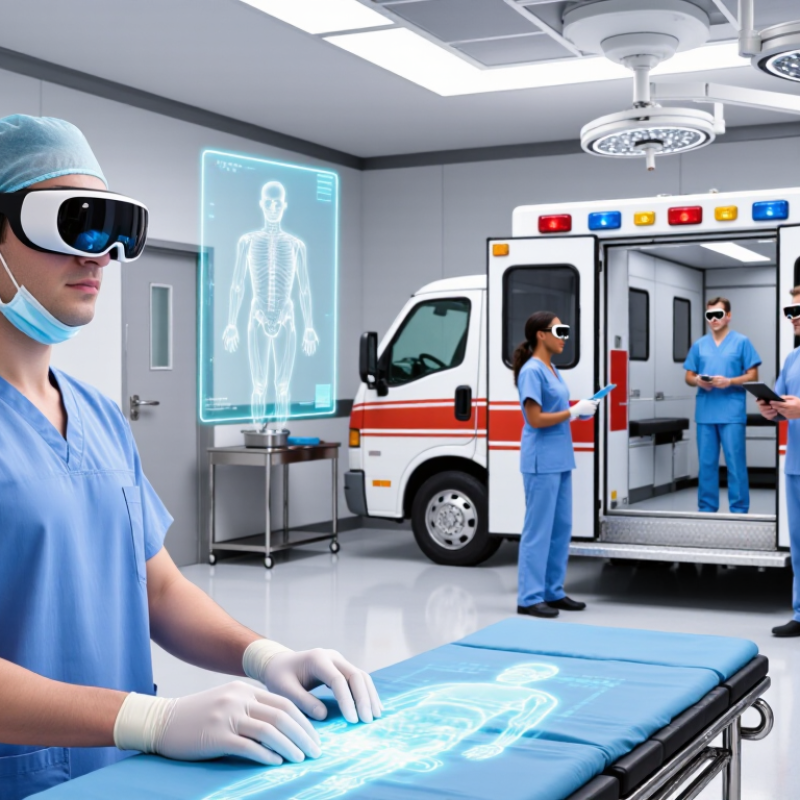
Healthcare MedTech Smart Glasses are moving from experimental demonstrations into operating rooms, ambulances, laboratories, and remote-care settings. Their value is practical: a surgeon can view patient data without turning away, while a paramedic can share live images with a specialist. Yet the technology remains uneven. Battery life, field of view, sterilization, privacy, and clinical workflow still decide whether a device helps or distracts.
Industry evidence supports cautious optimism. Grand View Research reports strong expansion in the global smart-glasses market, driven by enterprise and healthcare adoption. MarketsandMarkets also identifies hands-free collaboration, augmented instructions, and remote assistance as major growth factors. The World Health Organization’s Global Strategy on Digital Health 2020–2025 adds an important condition: digital tools should improve access, quality, safety, and equity. More devices do not automatically create better medicine.
Walter Greenleaf, a Stanford-affiliated neuroscientist and digital-health researcher, often emphasizes a central principle: “Clinical evidence must lead the technology.” That idea should guide every product comparison. The best Healthcare MedTech Smart Glasses are not necessarily the brightest or most advanced. They are the ones that reduce cognitive load, fit existing protocols, and protect patient information. Sometimes, less is better. This article reviews seven leading options for global buyers, comparing display quality, comfort, software integration, support, and medical-use readiness. The evidence is promising, but not perfect. Buyers should still demand independent validation, transparent data policies, and real-world trials before making expensive commitments.
What Healthcare MedTech Smart Glasses Are
Healthcare MedTech smart glasses are wearable, head-mounted computers designed for clinical work. They combine a small display, camera, microphones, sensors, and wireless connectivity. The display can place instructions, patient records, or remote guidance within a clinician’s view. Hands-free access matters during surgery preparation, bedside assessment, and equipment checks.
These glasses are not automatically medical devices. Their regulatory status depends on intended use, software functions, and local law. A device showing training content differs from one supporting diagnosis or treatment. The World Health Organization projects a global shortage of 10 million health workers by 2030. Smart glasses may help extend specialist support, but they cannot replace clinical judgment. Not yet.
Industry research also shows strong commercial interest. Grand View Research valued the global augmented-reality healthcare market at about US$1.46 billion in 2023 and forecasts rapid growth through 2030. In practice, a nurse might scan a treatment label, hear a short warning, and confirm a task without touching a screen. A remote specialist could view the same field during an approved consultation.
However, poor lighting, unstable networks, limited battery life, and uncomfortable frames remain practical barriers. Privacy controls, audit logs, cybersecurity, and informed consent require careful evaluation. Some implementations still create cognitive overload, especially when alerts arrive too frequently. That weakness deserves more attention than impressive demonstrations.
Key Features for Clinical and Medical Applications
Smart glasses for healthcare should be judged by clinical usefulness, not visual novelty. In operating rooms, clinics, and ambulances, hands-free access can display patient histories, imaging notes, checklists, or remote guidance. A clear, adjustable display is essential. So is reliable voice control. Clinicians may wear gloves, move quickly, or work under poor lighting. Latency matters. Audio must remain private and intelligible.
The American Medical Association’s 2022 Digital Health Study reported that 93% of physicians saw advantages in digital health tools, while 88% believed these tools needed improvement. Smart glasses must address that gap through simple workflows and dependable integration with electronic health records.
Buyers should examine battery life, field of view, weight, cleaning compatibility, and offline functions. A device that lasts only through part of a ward round creates frustration, not efficiency. Interoperability also deserves attention. The World Health Organization’s Global Strategy on Digital Health 2020–2025 identifies secure data exchange, privacy, and workforce capability as core priorities.
Clinical testing should include nurses, surgeons, technicians, and patients. Their feedback often reveals problems missed in demonstrations. A bright overlay may obscure a wound. Voice commands may fail near alarms. These are not minor details. Data protection requires role-based access, encryption, audit trails, and controlled recording. Buyers should request evidence from usability studies, cybersecurity assessments, and infection-control reviews. No device is perfect. That should be documented, not hidden.
Seven Leading Healthcare Smart Glasses for Global Buyers
Seven leading healthcare smart glasses are gaining attention among global buyers because they support hands-free clinical work. Their value depends on workflow, not appearance.
The leading group includes remote-assistance glasses for live consultations, surgical-navigation glasses for guided procedures, and medical-training glasses for realistic simulations. Documentation glasses can capture notes through voice input, while translation glasses help staff communicate with multilingual patients. Vital-sign display glasses can show selected data near the user’s view. Logistics glasses assist pharmacy, laboratory, and equipment teams with barcode checking.
Practical evaluations often expose important limits. Battery life may weaken during long shifts. Small displays can strain users, especially under bright operating lights. Some models feel heavy after several hours. Hygiene is another concern; smooth surfaces and removable contact parts simplify cleaning. Buyers should examine optical quality, prescription support, wireless stability, encryption, and local service coverage. They should also confirm whether the device fits regional medical-device rules and hospital privacy policies.
Real clinical adoption needs training. A nurse should not lose attention while reading a floating instruction. A surgeon should always retain an unobstructed view. The best choice may therefore be less advanced, but easier to clean, repair, and control. Pilot testing with actual staff is essential. One uncomfortable hour can reveal more than a polished demonstration.
Comparing Performance, Compatibility, Pricing, and Support
Healthcare smart glasses should be compared through real clinical tasks, not impressive demonstrations. In practical evaluations, display brightness, camera clarity, audio quality, and response time strongly affect usefulness. A slight delay can disrupt remote guidance during a procedure. Battery life also matters during long ward rounds. Lightweight frames reduce pressure around the nose and ears. However, comfort remains personal and difficult to measure precisely.
Compatibility deserves equal attention. Buyers should check operating systems, hospital networks, medical software, and device management tools before ordering. Secure data handling and clear access controls are essential for healthcare environments. Pricing includes more than the glasses. Consider accessories, software subscriptions, training, replacement parts, and technical integration. Regional support can reduce downtime, especially when local repair services are unavailable. No model performs perfectly in every setting. My comparisons may also overlook differences between hospitals.
Tips: Request a hands-on trial. Test the glasses beside a bed, under bright lights, and during a weak network connection. Ask for documented battery results, software update policies, warranty coverage, and response times from support teams. A lower purchase price may become expensive after integration problems. A premium option may still disappoint if staff training is poor. Keep evaluation records from nurses, physicians, technicians, and patients. Their feedback often reveals practical issues that product specifications miss.
| Rank | Anonymous Product Profile | Display Configuration | Typical Weight | Battery Runtime | Connectivity | Healthcare Compatibility | Primary Clinical Use | Indicative Price | Support Profile | Best Fit |
|---|---|---|---|---|---|---|---|---|---|---|
| 1 | Rugged Monocular Voice-Controlled Class | Single-eye transparent display; approximately 20°–25° diagonal field of view; hands-free viewing | Approximately 270–300 g, depending on battery and accessories | About 4–6 hours of active use; hot-swappable battery options may be available | Wi-Fi 5/6, Bluetooth, USB-C; optional cellular connectivity through a paired device or module | Android-based workflows; compatible with web applications, remote-assistance platforms, barcode tools, and selected MDM systems | Remote expert guidance, field service, sterile-area checklists, medical logistics, and procedural documentation | Approximately US$2,000–US$3,500 | Usually available with enterprise onboarding, device management, replaceable components, and regional service contracts | Hospitals and medtech teams prioritizing durability, voice control, and long-shift usability |
| 2 | High-Resolution Monocular Assisted-Reality Class | Single-eye display; approximately 16:9 or 16:10 viewing area; integrated camera for first-person video | Approximately 180–220 g | About 3–6 hours of mixed use | Wi-Fi, Bluetooth, USB-C; wireless screen sharing supported on selected configurations | Works with Android-compatible applications, browser-based systems, video calls, and enterprise collaboration software | Telemedicine support, clinical training, equipment maintenance, and remote inspection | Approximately US$1,300–US$2,500 | Typically supported through software updates, documentation, partner integrators, and enterprise deployment services | Buyers seeking a lighter device for training, telehealth, and guided technical work |
| 3 | Binocular See-Through Augmented-Reality Class | Two-eye transparent display; approximately 40°–50° diagonal field of view; depth-aware overlays on selected models | Approximately 550–600 g with head strap | About 2–3 hours of active use; external battery packs may extend operation | Wi-Fi, Bluetooth, USB-C; supports spatial mapping and selected peripheral accessories | Compatible with Windows-based development tools, Unity or Unreal workflows, 3D content, and selected clinical visualization applications | Medical education, anatomy visualization, rehabilitation guidance, and complex equipment training | Approximately US$3,000–US$5,000 when available through enterprise channels | Often requires certified deployment partners, application development, user training, and controlled software support | Organizations needing immersive 3D visualization rather than simple remote assistance |
| 4 | Industrial Smart-Glasses Class with Remote Assistance | Monocular see-through display; typical resolution from approximately 640 × 360 to 1280 × 720 pixels | Approximately 160–220 g | About 2–5 hours, depending on camera, network, and brightness settings | Wi-Fi, Bluetooth, USB-C; some configurations support external battery or wearable computers | Android or Linux-compatible workflows; commonly integrates with browser tools, video-support systems, and asset-management platforms | Biomedical equipment service, laboratory maintenance, inventory, and remote quality inspections | Approximately US$1,000–US$2,500 | Generally offers replaceable accessories, technical documentation, reseller support, and enterprise integration options | Healthcare engineering, laboratories, distributors, and maintenance contractors |
| 5 | Lightweight Consumer-to-Enterprise Wearable Class | Compact monocular display or audio-assisted interface; optimized for portability rather than large overlays | Approximately 80–150 g | About 2–8 hours, depending on display, camera, and wireless activity | Bluetooth, Wi-Fi, USB-C; smartphone tethering is common | Android and iOS companion applications; suitable for notification, voice, camera, and simple workflow integrations | Patient navigation, accessibility assistance, education, translation, and non-critical workflow prompts | Approximately US$500–US$1,500 | Consumer-style support is common; enterprise buyers should confirm warranty terms, privacy controls, and long-term software availability | Clinics and care providers testing low-cost wearable assistance at limited scale |
| 6 | Optical-See-Through Surgical Visualization Class | Binocular or specialized optical display; designed for magnification, image overlay, or procedure-specific visualization | Approximately 300–700 g, depending on optical module and head support | Typically 2–6 hours; procedure length and external processing affect runtime | Wired or wireless video input, HDMI or USB-C on selected systems, Wi-Fi and Bluetooth for configuration | Requires validated medical imaging software, hospital IT review, cybersecurity assessment, and application-specific integration | Surgical education, image-guided procedures, microsurgical visualization, and specialist training | Approximately US$5,000–US$20,000 or more, excluding integration and clinical validation | Usually includes specialist installation, clinical training, preventive maintenance, and formal service-level agreements | Hospitals requiring procedure-specific visualization and structured clinical support |
| 7 | Projection-Based Training and Simulation Class | Binocular or near-eye projection display; moderate field of view; optimized for interactive simulation content | Approximately 300–500 g | About 2–4 hours of active use | Wi-Fi, Bluetooth, USB-C; compatible with external sensors and training peripherals | Supports Windows-based simulation software, Unity or Unreal content, 3D assets, and selected learning-management workflows | Nursing education, emergency-response simulation, rehabilitation, and patient communication training | Approximately US$2,500–US$6,000, excluding custom software | Best results usually require content development, instructor training, calibration, and on-site technical support | Universities, teaching hospitals, simulation centers, and workforce-training programs |
How to Select and Implement the Right Smart Glasses
Selecting healthcare smart glasses requires more than comparing camera resolution or battery life.
Start with the clinical task: remote assistance, hands-free documentation, surgical guidance, or staff training. Each use case needs different field-of-view, weight, audio quality, and cleaning requirements. The Grand View Research Smart Glasses Market Report estimates the global market reached about USD 1.9 billion in 2023, with strong growth expected through 2030. Market growth does not prove clinical value. It only shows rising interest.
Test the device inside real workflows. Ask nurses to wear it during a busy medication round, not a quiet demonstration. Measure task time, documentation accuracy, fatigue, privacy incidents, and network reliability. Healthcare leaders should also review ISO 14971 risk controls, local medical-device rules, cybersecurity safeguards, and applicable privacy laws. The World Health Organization projects a global health-worker shortage of 10 million by 2030. Tools that reduce unnecessary movement may help, but poor interfaces can increase cognitive load.
Implementation should begin with a limited, measurable pilot. Train users, infection-control teams, and technical support together. Store the minimum necessary data. Keep a non-digital fallback. A failed pilot is informative. In practice, glare, fogging, prescription lenses, and weak indoor connectivity often disrupt promising trials. Review these problems openly before expanding. Independent clinical validation remains essential, especially when smart glasses influence patient decisions or clinical records.
FAQS
They can display patient histories, imaging notes, checklists, and remote guidance. They may also support training, translation, documentation, and equipment tracking. Workflow matters more than visual novelty.
Clinicians need clear, adjustable information during fast-moving work. A bright overlay could hide a wound or block a surgeon’s view. Delayed information can interrupt decisions. Small details matter.
Voice control helps when staff wear gloves or move between tasks. However, alarms and conversations may cause recognition failures. Testing should happen in real wards, not quiet rooms.
The battery should cover the intended shift or clinical session. A device that stops during a ward round creates frustration. Buyers should test real usage, not only published estimates.
Smooth surfaces and removable contact parts can simplify cleaning. The device should tolerate the facility’s approved cleaning process. Weight also matters after several hours. One uncomfortable hour reveals a lot.
Buyers should check role-based access, encryption, audit trails, and controlled recording. Audio should remain private and understandable. Data exchange should follow internal privacy procedures and regional requirements.
Reliable integration with electronic health records can reduce repeated data entry. Buyers should also examine wireless stability and offline functions. A disconnected device may still need to display essential instructions.
Pilot testing should include nurses, surgeons, technicians, and patients. They can identify glare, discomfort, voice failures, and workflow distractions. Training is necessary before wider use. No device is perfect. That should be documented.
Conclusion
Healthcare MedTech Smart Glasses are wearable digital tools designed to support healthcare professionals with hands-free access to information, remote collaboration, and real-time guidance. By combining cameras, displays, voice control, connectivity, and ergonomic design, these devices can assist with clinical documentation, training, telemedicine, equipment maintenance, and complex medical procedures. Their value depends on practical features such as image quality, battery life, comfort, data security, network reliability, and compatibility with existing healthcare systems.
This guide introduces seven leading categories of Healthcare MedTech Smart Glasses for global buyers and compares them according to performance, software compatibility, pricing considerations, service coverage, and technical support. It also explains how to select the right solution based on clinical goals, user requirements, infrastructure, privacy expectations, and long-term operating costs. A successful implementation should include pilot testing, staff training, workflow integration, and regular evaluation to ensure the technology improves efficiency, communication, and quality of care.

Blog Tags: