Choosing a Smart Manufacturing AR Headset is less about chasing the newest display and more about matching equipment to real factory work. A technician inspecting a motor may need sharp overlays and hands-free access to repair instructions. A warehouse supervisor may care more about battery life, comfort, and reliable connectivity across a large floor. Small differences matter. A headset that feels fine during a brief demonstration can become tiring during a full shift.
This guide compares seven options through practical criteria: visual clarity, field of view, durability, fit, software compatibility, and support for existing workflows. It also considers how devices handle tasks such as remote assistance, step-by-step assembly guidance, and access to digital work instructions. Specifications can help, but they do not tell the whole story. Lighting, noise, protective equipment, and network coverage can change the experience considerably. No single model is best for every facility, and product capabilities may vary by configuration or software plan. That judgment is not perfect; workplace trials are still valuable. The aim is to give decision-makers a clear starting point, not a substitute for testing devices with their teams. Look closely at comfort and usability. Those details are easy to underestimate.
Why AR Matters: Deloitte Found 86% See Smart Factories Driving Competitiveness
What Are the 7 Best Smart Manufacturing AR Headsets?
Why AR Matters: Deloitte Found 86% See Smart Factories Driving Competitiveness
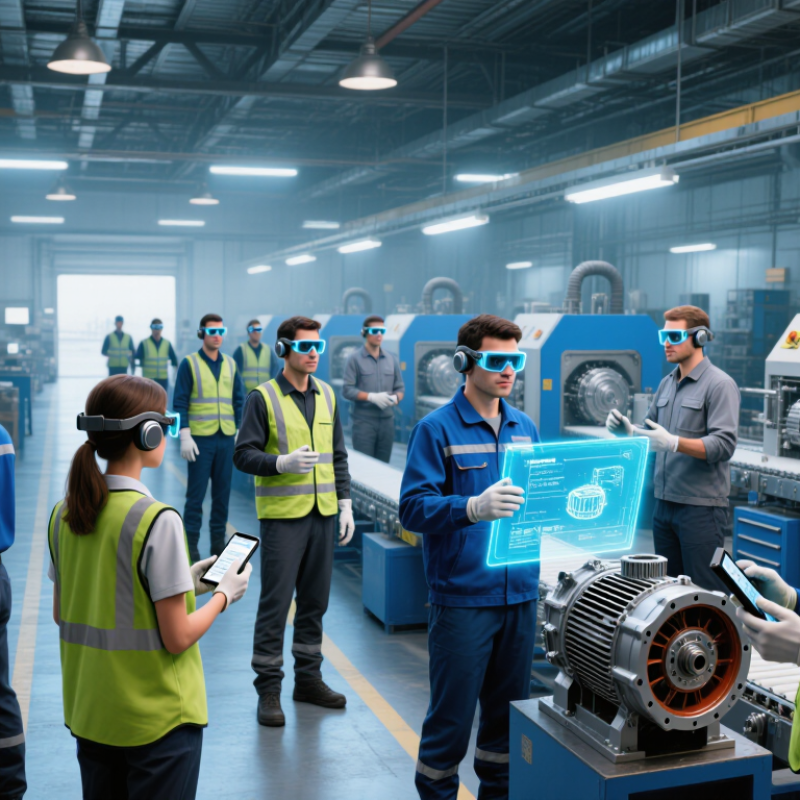
Deloitte reported that 86% of respondents see smart factories as a way to strengthen competitiveness. That is a striking signal, not a guarantee. A factory becomes smarter only when useful information reaches the people making decisions. On a busy production line, a technician may need to identify a valve, check a reading, and follow a repair sequence. An AR headset can put concise instructions in view, reducing trips to a terminal and helping experienced staff share know-how. Small moments matter.
When comparing headsets, the useful question is not which device looks most advanced. Can workers read overlays under bright lights, hear colleagues near machinery, and wear it through a full shift? Battery life, comfort, glove-friendly controls, cleanability, and fit with existing systems deserve hands-on testing. AR can support guided training or remote assistance, but it cannot fix poor data or unclear procedures. Some overlays may distract more than they help. Pilot one task, observe real users, and revise the workflow before expanding. That takes patience.
Which 7 AR Headsets Lead Manufacturing? Compare HoloLens 2 and RealWear
A useful comparison of seven manufacturing AR headsets starts with the work, not a ranked list. Some offer see-through, spatial displays for inspecting 3D instructions beside machinery. Others use a compact, rugged monocular screen and voice control, keeping one eye on the production line. These designs serve different needs. A spatial headset can help with assembly guidance, remote collaboration, and visualizing equipment layouts. A voice-operated device may suit inspections where workers need clear peripheral vision and hands-free access to checklists.
Fit matters. In a noisy factory, voice commands may misfire, so test them near actual machines. Check whether gloves, safety glasses, and protective headwear fit comfortably with the headset. Also compare battery life, display readability under bright lights, field of view, camera quality, and device-management support. For teams weighing a spatial headset against a rugged monocular model, run the same task on both: ask a technician to follow a repair procedure while keeping tools in hand. Record errors and fatigue, not just setup time. A demo can look convincing. A full shift may feel different. No single device leads every plant; the best choice depends on task, environment, and worker feedback.
Field of View Across Seven Enterprise AR Headsets
A wider field of view can make digital overlays easier to see, but it is only one factor in choosing a headset for manufacturing. Values are diagonal field-of-view specifications published for representative devices; labels describe device types, not brands.
How Do Display, Field of View, Runtime, and IP Ratings Affect Shop-Floor Fit?
The seven best smart-manufacturing AR headsets should be judged by fit on the line, not headline specifications. Display clarity matters when technicians read tiny torque values under bright task lighting. ISO 9241-303 sets ergonomic requirements for electronic visual displays, including legibility and viewing comfort. Field of view matters too: a narrow view can keep instructions readable but hide nearby movement. A wide view helps workers stay aware, though overlays may feel crowded. Test both while looking down at a bench and across a moving work cell.
Runtime claims need context. Camera use, wireless connection, screen brightness, and temperature can shorten battery life. Check performance during a full shift, not a brief demonstration. Heavy front-mounted hardware can also become tiring during repeated overhead work. Small details count. A loose strap or fogged lens can turn useful guidance into another task. One caveat: workers differ, so a short wear trial is more reliable than a single comfort score.
For dusty or damp areas, compare the rating digits using IEC 60529. IP54 means dust protection and resistance to splashing water; IP65 means dust-tight construction and protection against water jets. Neither rating alone proves suitability for every cleaning routine. Ask how the device handles the site’s actual dust, spray, and wipe-down practices. Record the display setting, task duration, and battery level during trials. Imperfect field notes are still better than showroom impressions.
Which Headsets Suit Assembly, Inspection, Training, and Remote Support?
For assembly, a lightweight monocular headset can show one instruction at a time while keeping the worker’s view mostly clear. A binocular see-through model suits tasks requiring aligned diagrams over machinery, but can feel tiring during long shifts. Ruggedized headsets help in dusty or noisy production areas. Check glove-friendly controls and cleanable surfaces before deployment.
Inspection calls for a sharp display and a stable camera. A high-resolution passthrough headset can help workers compare a component with a digital reference, though camera color may differ from what the eye sees. A hands-free camera headset is often more practical for close visual checks and remote expert guidance. Small details matter. Test it under actual factory lighting, not just in a showroom.
For training, shared-use headsets with replaceable face interfaces can simplify shift changes, while clear overlays can guide new operators through machine setup. A tethered, workstation-grade headset may suit fixed training stations, but it is less convenient on a moving line. Remote support benefits from a lightweight camera headset with reliable audio and low-latency video. No single design fits every task; even a promising trial can miss the discomfort that appears after several hours.
How Should Buyers Measure Pilot Results: Task Time, Errors, and Total Cost?
An AR headset pilot should prove a production gain, not just impress visitors. Track task time, errors, and total cost against a baseline from the same line, shift, and product mix. Compare similar tasks across headset and standard-work periods. Record rework, missed steps, safety stops, and time spent asking for help. Faster is not better if defects rise. Small sample? Be cautious.
Deloitte’s 2024 Smart Manufacturing Survey, covering 600 executives, reports 7–20% employee-productivity improvement and 10–20% higher production output among smart-manufacturing initiatives. These are broad program benchmarks, not headset-specific promises. Set a realistic pilot target, then report median task time and the share completed correctly on the first attempt. Calculate cost per accepted task, including hardware, software, integration, training, cleaning, battery swaps, and support. Include downtime during updates. An overlooked factor: experienced operators may outperform novices regardless of the display. Log skill level and task complexity, and show results by group. If seconds are saved but supervisors must constantly intervene, the business case weakens. State the assumptions, sample size, and missing data; a tidy result can still mislead.
FAQS
Deloitte found 86% of respondents see smart factories as a way to strengthen competitiveness. AR can place repair steps beside a machine, reducing trips to a terminal. It helps only when the information is accurate.
Check comfort, battery life, display readability, audio, camera quality, and glove-friendly controls. Test under bright factory lights and with protective gear. Specs alone are not enough.
It can show one checklist item while leaving much of the worker’s view open. This can suit inspections and hands-free guidance. Voice commands may fail near loud machinery.
It can align diagrams or 3D instructions with equipment during assembly and remote collaboration. The display may feel tiring during a long shift. Test before assuming otherwise.
A stable camera and sharp display help workers compare components with digital references. Camera colors can differ from what the eye sees. Check actual parts, not just demo images.
Look for clear audio, low-latency video, and a lightweight camera headset. A technician can keep both hands on tools while an expert views the work. Audio matters.
Run the same repair task with different headset designs, if available. Record mistakes, fatigue, and setup time across a real shift. A demo is neat; a shift, less so.
No. It cannot fix poor data or unclear procedures. Start with one task, gather worker feedback, then revise the overlays. Some instructions may still feel cluttered.
Conclusion
A Smart Manufacturing AR Headset can help workers access hands-free instructions, visualize digital information, and collaborate with remote experts directly on the factory floor. The article explores why augmented reality is gaining attention, including a Deloitte finding that 86% of respondents see smart factories as a source of competitive advantage. It compares seven leading headset options without assuming that one device suits every workplace, and explains how display clarity, field of view, battery runtime, comfort, and ingress-protection ratings affect day-to-day use.
The right headset depends on the task: assembly may require clear step-by-step guidance, inspection may benefit from visual overlays, training may call for interactive demonstrations, and remote support may prioritize reliable communication. To assess whether a pilot is worthwhile, manufacturers can track task completion time, error rates, user feedback, and total cost of ownership. These measures help teams judge practical performance and identify where AR can deliver meaningful operational value.